amoon brothers film

  • Subscribe to our RSS feed.
  • Twitter
  • StumbleUpon
  • Reddit
  • Facebook
  • Digg

Wednesday, 6 July 2011

"Download map" for Android

Posted on 20:52 by tripal h
One way we bring you new product features is through Google Labs—a collection of fun, experimental features you can turn on if you’re interested in the functionality. In fact, Google Maps itself started as a lab. In addition to our desktop Maps Labs, Google Maps for Androidhas a few tricks you can try out right from your phone. We’d like to introduce you to one new experimental feature, “Download map area," but also remind you of two other ones we already have: “Scale bar” and “Measure.”

Download map area
When you’re visiting an unfamiliar location, Google Maps for mobile is great for getting an idea of how close you are to your destination, where streets and landmarks are in relation to each other, or just for getting “un-lost.” But what if you don’t have a data signal, or you’re abroad and don’t have a data plan? We say that if you use Google Maps for mobile, you’ll never need to carry a paper map again. The “Download map area” lab in Google Maps 5.7 for Android is a step in making that statement true even when you’re offline.

Let’s say later you’re visiting Bordeaux during a trip to France. If you were to open Google Maps for mobile and zoom into Bordeaux without data coverage or wifi, you’d see the image on the left:
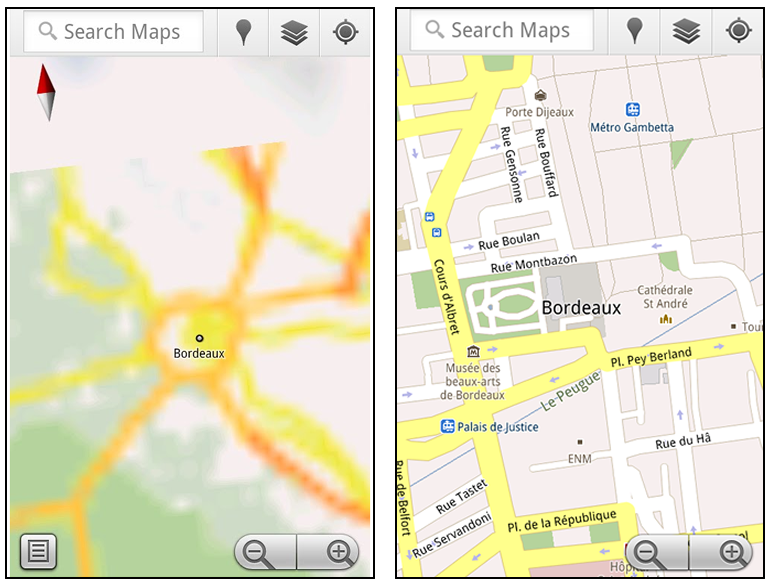

Left: Bordeaux with no data or wifi. Right: Bordeaux with downloaded map area

That’s not particularly useful when you’re trying to find out how close you are to the Cathedrale St. Andre. But a little advance planning and “Download map area” can help. Before you take your trip, while you still have access to WiFi or data coverage, you can open up any Places page in the world, click “More” to get the Place page menu, and download Google’s maps for a 10-mile radius.
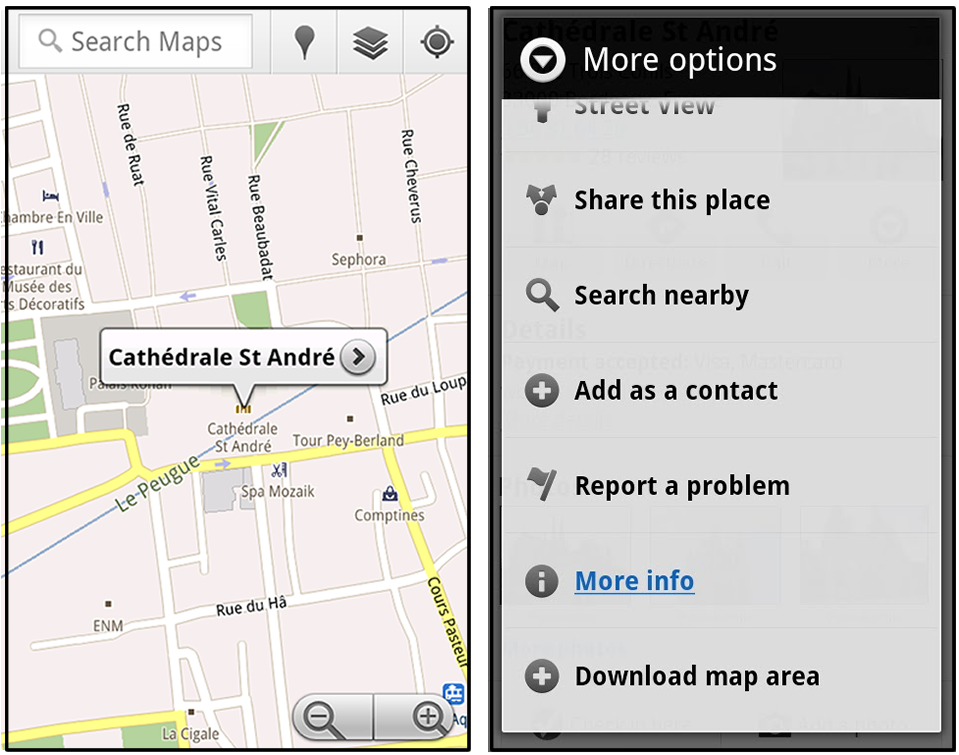

Left: Tap a landmark to enter its Place page. Right: Place page “more options” menu

The download can take as little as a minute or two. This download stores only the base map tiles and the landmarks on the map, so you still need a data connection to see satellite view and 3D buildings, search for Places and get directions. But we hope the level of detail available will help you find your way!


Left: Status screen for download. Right: Coverage of downloaded map area

All your downloaded map areas can be managed in your Google Maps cache settings so you can delete maps you no longer need or if you want to free up storage. After 30 days, all downloaded map areas will be removed from your cache; they can be re-downloaded any time.

Scale bar
Google Maps has approximately 20 different zoom levels that range from a 2,000 mile scale to a 20 foot scale. With finger gestures making it really quick and easy to zoom in and out, sometimes it’s not always clear what zoom level you’re at. What might be just a few streets away can be quite a long walk depending on the scale. To help with this, you can turn on a scale bar, which updates based on your zoom level.


Scale bar in the lower left

Measure
If you ever need to know the distance between San Francisco and New York (about 2602 miles) or between any other two points on the map, the “Measure” lab can help you out. Once it’s enabled, you’ll notice a tape measure icon just above the zoom buttons. After clicking that icon, you’ll be prompted to tap two points on the map and Google Maps will calculate the straight distance between those points (this direct distance is “as the crow flies”).
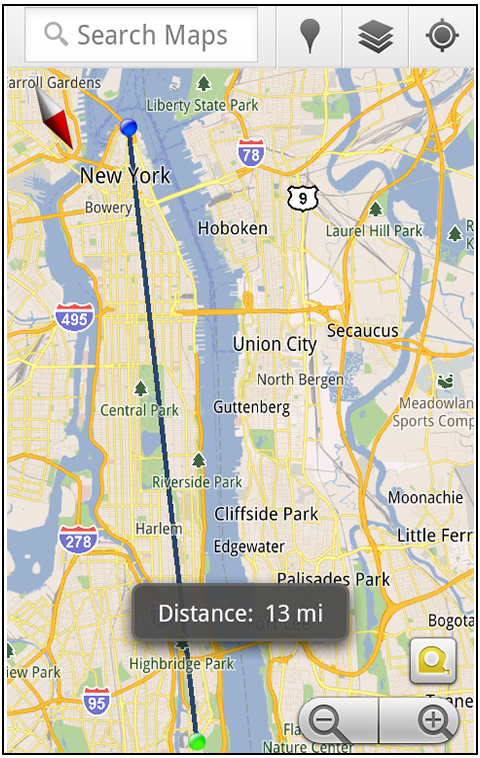

Example of the “Measure” Labs feature

To access Labs on your phone, press your phone’s menu button once in Google Maps, choose “More” and select Labs. On a tablet, click the menu button in the upper-right corner of Maps. The “Download map area” lab requires Android 2.1+ and the latest version of Google Maps. We look forward to bringing you more experimental features soon and hope you enjoy trying out Labs in Google Maps for Android.

source: http://googleblog.blogspot.com/2011/07/download-map-area-added-to-labs-in.html
Email ThisBlogThis!Share to XShare to Facebook
Posted in Technology | No comments
Newer Post Older Post Home

0 comments:

Post a Comment

Subscribe to: Post Comments (Atom)

Popular Posts

  • Despicable Me 2 《神偷奶爸2》toys
     Happy Meal " Despicable Me 2 《神偷奶爸2》 " toys, available for  collection on July 2013 at McDonald's in Philippines, Indonesi...
  • 20 Slang Malaysians love to use
    Popular Malaysian Slang Note: This article on 20 Slang Malaysians love to use was written by our Malaysian writer and created and first pub...
  • Users Can No Longer Download Videos From Youtube
    If you haven’t noticed it yet, all the youtube video downloading applications have stopped working again (Mar 2010). Obviously Youtube (Goo...
  • Miss USA Wore A Transformers Costume In The Miss Universe Pageant And It Wasn’t Even The Most Ridiculous Outfit
    One of the events of the Miss Universe pageant is the “Parade of National Costumes,” where each of the 86 contestants walks the runway in ...
  • Proof That Aladdin And T*tanic Are Basically The Same Movie...
  • 台湾香港的23个不同之处(搞笑版)
    台湾和香港有什么分别?台湾人怎样看香港人?最近有一个台湾哥们充分发扬自黑精神,画了一套漫画……大家自行感受吧……
  • 你睇!!多啦A梦嚟啦! 诞生前100年祭
    剛介紹完香港海港城的 多啦A夢 誕生前 100 年祭 的 三個經典場景再來搶鮮看是即將開幕的 未來法寶概念展 + 限定商店 商品販售 (2012.8.14到9.16) ,在這蒐集了十多個國家近30年充滿夢想與創意的多啦A夢的道具法寶,限定商店,販售了...
  • 35 Clearest Waters In The World To Swim In Before You Die
    Every one loves taking a dip in the clearest of waters on a beautiful hot summers day. So if you are missing the summer already then check ...
  • When You Look Closely At These 10 Photos, You’ll See Why They Mean So Much.
    Photographer Tom Hussey created a series of pictures that will speak to you, no matter your age, race, beliefs or occupation. The...
  • 《追风少年》后面捉着恐龙的《小孩》的脸遭人破坏了!
    《姐弟共骑脚车》壁画的污迹刚清洗完毕没有几天,今天又 惊传另外一幅亚贵街的《追风少年》后面捉着恐龙的《小孩 》的脸又遭人破坏了!丽香刚拍回来的照片证实了这个小孩 的脸遭人破坏了... 这些破坏份子可恶极了!

Categories

  • 2011
  • 428 (Bersih 3.0)
  • 709 (Bersih 2.0)
  • Cancer
  • Celebration
  • Entertainment
  • Finance
  • Food and Beverage
  • Games
  • Gay
  • Health
  • Hobby
  • Info
  • Inspiration
  • Joke
  • Language
  • Movie
  • News
  • News and politics
  • Newspaper Cutting
  • PC
  • Promotion / Offer / Sales / Discount
  • Quake
  • Scam / Hoax / Fake
  • Sport
  • Technology
  • Toys
  • Travel
  • Tricks
  • Ugly Truth

Blog Archive

  • ►  2014 (72)
    • ►  August (2)
    • ►  July (5)
    • ►  June (6)
    • ►  May (14)
    • ►  April (14)
    • ►  March (13)
    • ►  February (6)
    • ►  January (12)
  • ►  2013 (276)
    • ►  December (11)
    • ►  November (15)
    • ►  October (13)
    • ►  September (13)
    • ►  August (21)
    • ►  July (29)
    • ►  June (23)
    • ►  May (30)
    • ►  April (35)
    • ►  March (47)
    • ►  February (14)
    • ►  January (25)
  • ►  2012 (72)
    • ►  December (2)
    • ►  November (5)
    • ►  October (3)
    • ►  September (9)
    • ►  August (24)
    • ►  July (8)
    • ►  June (3)
    • ►  May (2)
    • ►  April (6)
    • ►  March (7)
    • ►  February (2)
    • ►  January (1)
  • ▼  2011 (66)
    • ►  December (7)
    • ►  November (2)
    • ►  October (2)
    • ►  September (4)
    • ►  August (4)
    • ▼  July (20)
      • 709 的花絮和感想 (Something about 709)
      • UN human rights expert criticizes ‘heavy-handed’ p...
      • 警方两面夹攻,集会者无逃生机会
      • Someone Did Win on July 9th
      • 警方向同善医院发射不容否认 隆雪华堂:说谎非我们的文化
      • Nothing is sadder when the protector preys upon it...
      • Truth that Cannot Be Cover - Bersih 2.0 09/07/2011
      • My Bersih 2.0 Experience
      • It’s not just about 5,000 or 50,000, Najib — by Cl...
      • Bersih 2.0 - The Lies vs the Truth
      • BERSIH's joke
      • Bersih 2.0: Titah nasihat Agong kejutkan pemimpin ...
      • 停止打压净选盟释放社党领袖 隆雪华青批纳吉政府出尔反尔
      • 超渡你自己
      • "Download map" for Android
      • Bersih 2.0: Winners and losers
      • 马来西亚如今已变成一个警察国,除了警方外,总检察署也可妄顾法律,任意行使权力。
      • i want to say this to YOU
      • MCMC: We will shut down websites if necessary
      • 我为什么期待709?
    • ►  June (14)
    • ►  May (1)
    • ►  April (3)
    • ►  March (4)
    • ►  February (3)
    • ►  January (2)
  • ►  2010 (13)
    • ►  December (3)
    • ►  October (5)
    • ►  August (5)
Powered by Blogger.

About Me

tripal h
View my complete profile